
Xbox Switch Emulator Installation Tutorial: Eden Xbox Complete Deployment Guide (October 2026)
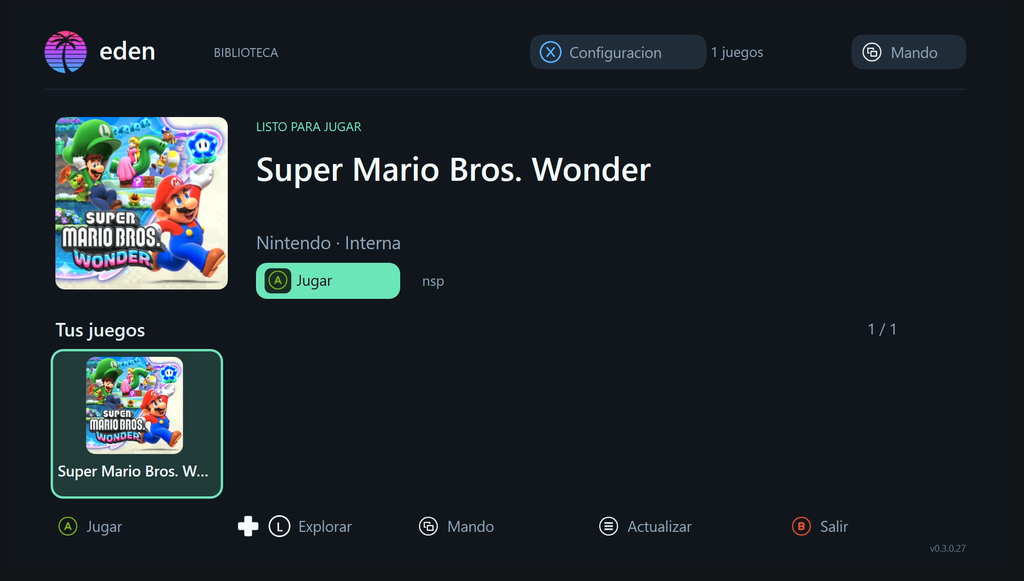
An Xbox Switch emulator has been working on compatibility with the platform for a long time, but due to limitations in graphics processor translation, a preliminary working version was only released last month. I tested this version on an Xbox Series S, and while running *Super Mario Bros.*, the highest frame rate was 60 FPS, with the lowest being below 10 FPS, resulting in noticeable stuttering. This emulator still requires a long period of optimization before it can be used normally. Xbox users who want to try it out can follow the tutorial in this article to set it up and play. It is important to emphasize that the current version does not yet meet the requirements for normal gameplay.
This tutorial primarily explains how to configure Eden Xbox. Before installing the Eden emulator, you need to enable Developer Mode on your Xbox. Enter Developer Mode on your Xbox in retail mode via Xbox Dev Mode, and connect your Xbox and PC/phone to the same local network. See the tutorial for detailed instructions.Installing Game Emulators in Xbox Developer Mode: From Beginner to Expert 。
Microsoft has simplified the developer account registration process, allowing individual developers to open an account for free, without the previous one-time $19 fee. Once in developer mode, Xbox will have a separate developer system where users can install UWP apps and emulators.
1. Download and install
- In retail mode, activate and access the service on Xbox via Xbox Dev Mode.Developer modeAnd connect your Xbox and computer/phone to the same local network.
- Download the Eden-Xbox emulator and then extract it on your computer. It contains files including applications, public certificates, Microsoft dependencies, and verification documents.
- Install the emulator through the Xbox Device Portal. The Device Portal address is usually...https://yourxboxIP address: 11443
- Find Eden in the Xbox app list and set it as your Xbox app.gamemode, then press
 Run it. For instructions on switching game modes, please refer to [link/reference].How to enable Game Mode in Xbox Developer Mode for optimal emulator performance?
2. Configure your key, firmware, and game.
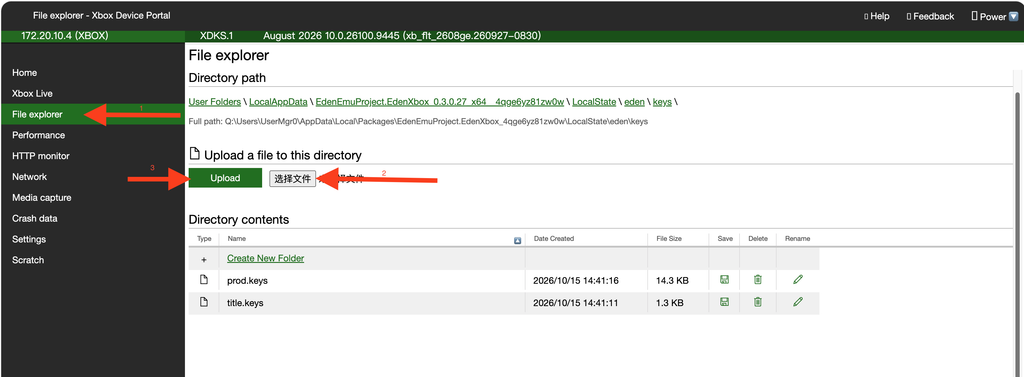
Access the Xbox Device Portal in your browser, find the File Explorer in the left-hand menu, and place the file into Eden storage.File ExplorerIn the middle, open one by one LocalAppData → Eden Xbox → LocalState folder.ShouldEden XboxThe package name varies depending on the version; select the one containing 'Eden' to open.LocalStateThis folder is where Eden reads data; it's not a temporary folder. In future updates, external storage such as USB drives or external hard drives will be available for importing the key and firmware.
existLocalState Inside the folder, click 'Create New Folder' to create a folder named 'eden'. This folder contains two subfolders: 'keys' and 'nand'. Upload the Switch key files (prod.keys, title.keys) to the 'keys' folder. Inside the 'nand' folder, create a subfolder named 'system', then a subfolder named 'Contents' within 'system', and finally a subfolder named 'registered' within 'Contents'. Upload the Switch firmware to this subfolder and extract it. All the complete paths and nesting relationships should look like the folders below.
LocalState/
├── eden/
│   ├── keys/
│   │   ├── prod.keys
│   │   └── title.keys       (Optional)
│   └── nand/
│       └── system/
│           └── Contents/
│               └── registered/
│                   └── *.nca (hasil ekstrak ZIP firmware)
└── games/
    ├── game-1.nsp
    └── game-2.xci
Installation key
Upload the Switchkeys file obtained from elsewhere to the LocalState/eden/keys folder. Eden will automatically read the key file from this location during runtime. At least the prod.keys file must be uploaded; title.keys is optional.
Install firmware
Upload the Switch Firmware file you obtained to the LocalState/eden/nand/system/Contents/registered folder. If it is a compressed file, an 'Extract zip file contents to this directory?' dialog box will pop up after clicking upload. Please click the OK option, and it will automatically decompress the compressed file. Just wait for it to finish uploading.
Note: Please ensure that the key has been installed before using the firmware. If the compressed package contains additional folders, please place the firmware file in the root directory.
Install game
Since the current version does not support external storage, the game can only be temporarily uploaded to the LocalState/games folder via the Xbox Device Portal's file explorer. The game supports the .nsp.xci.nro.keys.nca format. After uploading, please check the status keys and... I configure → File Manager The number of firmware files in the library. If the game still hasn't appeared, go back to the library and press [the button].menuUpdate the list.
Note: Please do not nest more than four subfolders in the uploaded game folder, otherwise the game will not be able to be read.
statement
This website does not provide Switch keys, firmware, games, pirated download links, or support for pirated software; it only publishes tutorials on emulator installation and usage.