
Xbox Desktop Mode Released: A Windows-Like Desktop Environment for Xbox Developer Mode
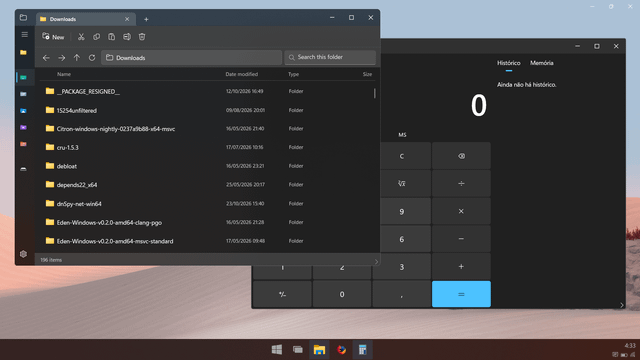
A new project called Desktop Mode has been introduced in the Xbox Homebrew community, bringing a desktop-style experience to Xbox consoles running Developer Mode.
Inspired by Windows 10X, Desktop Mode aims to provide a more complete desktop environment within an independent UWP application. It features a Start Menu, taskbar, window management, file manager, web browser, and several built-in applications.
Unlike projects that attempt to modify the Xbox operating system, Desktop Mode runs as a standalone UWP application without replacing the original Xbox system software.
1. A Windows-Like Desktop Experience on Xbox
Desktop Mode features an interface inspired by Windows 10X, with a taskbar, Start Menu, and window management system designed to organize multiple applications.
The project already supports several desktop features, including multi-window operation, Task View, and window switching.
Users can view running windows through the taskbar and switch between applications using the Alt + Tab shortcut.
The project also includes native USB mouse support, along with DPI and interface scaling adjustments for different display environments.
This approach allows Xbox users to experience a more PC-like desktop workflow within a standalone application, rather than being limited to traditional full-screen UWP interfaces.
2. Key Features
Desktop Mode includes several integrated components designed to create a more complete desktop environment.
2.1 Desktop and Window Management
The desktop environment includes:
- Windows 10X-inspired desktop interface
- Start Menu and application pinning
- Taskbar with running application indicators
- Task View for managing open windows
- Alt + Tab window switching
- Multi-window management and focus control
- Light and dark themes
2.2 Built-in File Manager
Desktop Mode includes a file manager called Files, featuring tabbed browsing, multi-file selection, context menus, and file operations.
One particularly useful feature is its archive management support, including ZIP, 7z, and RAR formats for creating and extracting archives.
File copy, move, and delete operations also have dedicated progress windows, allowing users to continue interacting with the desktop while file operations are running.
However, file access remains subject to UWP application permissions. The file manager cannot freely access every part of the Xbox system filesystem.
2.3 Strawfox Web Browser
The project integrates a browser called Strawfox, offering several web browsing features:
- Web browsing
- File downloads and uploads
- Browser extension support
- Web App installation
- Integration with the desktop window manager
Web Apps can be installed as browser shortcuts, while some can also run in separate WebView2 windows.
This makes it possible to access a wider range of web-based services on Xbox, including online document editors, browser tools, and other web applications.
2.4 Built-in Windows Applications
Desktop Mode also integrates several familiar desktop applications:
- Windows Calculator: A full Windows calculator application.
- Notepad: Supports tabs, opening files, saving, and saving TXT documents under different names.
- Settings: Includes personalization, taskbar configuration, and device information.
- Action Center: Provides quick access to volume, network status, and system settings.
These applications work alongside the desktop window management system, allowing multiple applications to run within the same environment.
3. Experimental Win32Bridge: Exploring Windows EXE Compatibility
One of the most interesting technical aspects of Desktop Mode is its experimental Win32Bridge compatibility layer.
Traditional Windows desktop applications generally rely on Win32 APIs. However, Xbox Developer Mode primarily operates within the UWP application environment, which has significant differences in application interfaces, filesystem access, window management, and security permissions.
Win32Bridge attempts to load Windows PE executable files and provide selected Win32 API functionality through compatibility mechanisms that can operate within the UWP environment.
This is not equivalent to running a full Windows virtual machine, nor does it install traditional Windows desktop software directly into the Xbox operating system.
Experimental demonstrations have included:
- 7-Zip: Successfully launches and displays its graphical interface, with some file operations already working.
- Windows 7 Notepad: Has been demonstrated running with a graphical interface.
- Notepad++: Can create a window and display its toolbar, although the editing area still suffers from a black-screen issue.
It is important to note that Win32Bridge remains experimental. Its current capabilities do not mean that Xbox can already run all traditional Windows EXE applications.
4. Known Limitations
Despite its growing feature set, Desktop Mode still has several known limitations:
- Some WebAssembly games may not load correctly in Strawfox.
- Strawfox currently lacks WebGPU support.
- RAR archive extraction may still be unreliable.
- Some devices may experience taskbar startup failures.
- Minor performance stuttering can occasionally occur.
- WebView2 Web Apps currently have runtime loading issues.
- Win32Bridge compatibility remains limited, and most traditional Windows desktop applications cannot yet run reliably.
The project also recommends using a USB mouse and keyboard for a more complete desktop experience.
5. Download and Project Information
Desktop Mode is available on GitHub, where users can find the latest releases and installation packages.
- Project: Desktop Mode
- Project Type: Xbox / Windows UWP Desktop Environment
- Developer: Pedro1234-code
- Latest Referenced Build: Build 21286
- Target Platform: Windows UWP and Xbox Developer Mode
- Development Status: Experimental and actively developed
Official Project Links:
- GitHub Repository: https://github.com/Pedro1234-code/DesktopMode_uwp
- GitHub Releases: https://github.com/Pedro1234-code/DesktopMode_uwp/releases
- Developer Community: https://discord.gg/tnjJEuZTt
6. YOSOnia’s Take
Desktop Mode demonstrates another possibility for Xbox Developer Mode: expanding the console beyond its traditional role as a gaming platform for emulators and UWP applications.
Instead, the project explores how an independent desktop environment could provide additional functionality and new ways to interact with the console.
The development of Win32Bridge is particularly interesting. If compatibility continues to improve, it could eventually allow selected traditional Windows desktop applications to run within the Xbox UWP environment.
However, UWP sandbox restrictions, system API permissions, filesystem limitations, and application compatibility remain major technical challenges.
For now, Desktop Mode is best suited to users interested in Xbox Homebrew, UWP development, and experimental desktop environments.
It is not a replacement for a full Windows desktop operating system, and it does not turn an Xbox console into a conventional Windows PC.
YOSOnia will continue following this project and its future developments in Xbox desktop environments and Win32 compatibility.
Sources: Reddit r/XboxHomebrew and the official DesktopMode_uwp GitHub repository and Releases.
This article was researched and written by YOSOnia. All project copyrights and related rights belong to their respective owners.
Support this site
If these guides helped you, you can buy me a coffee and keep the project going.
You can also support us on these platforms (opens in a new tab)