
Vitox: Play PlayStation Vita Games on Xbox Series X|S
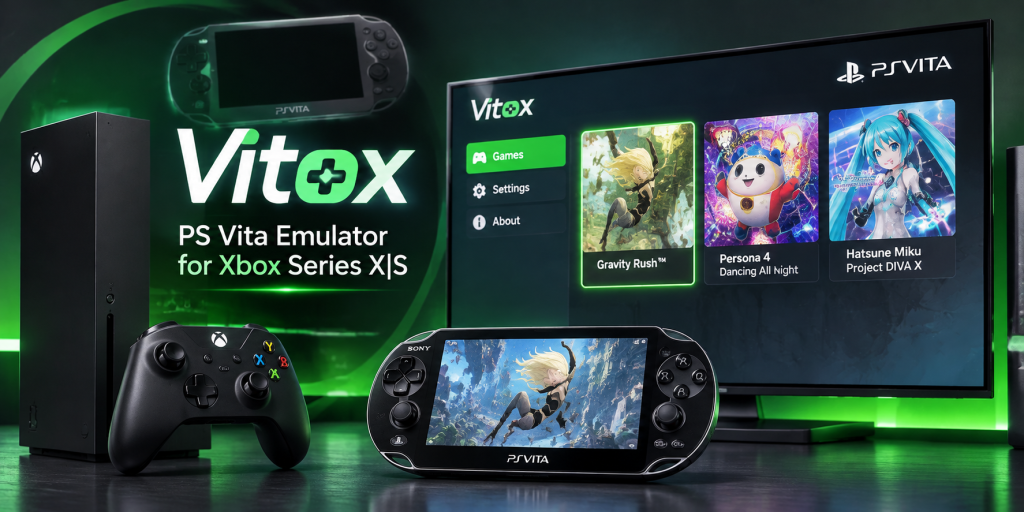
Vitox is a PlayStation Vita emulator project designed for Xbox Series X|S consoles running Developer Mode. Built around the open-source Vita3K emulator core, Vitox integrates Vita emulation into a UWP application, allowing Xbox users to run selected PlayStation Vita games and homebrew applications.
Unlike traditional PC-based emulators, Vitox is specifically adapted for the Xbox environment. It provides features such as game library management, USB game installation, controller configuration, and an in-game quick menu.
The project is currently in its early Alpha stage (0.1), and game compatibility and overall stability are still being improved. For Xbox Developer Mode enthusiasts and users interested in cross-platform emulation, Vitox is an interesting experimental project worth following.
1. What Is Vitox?
Vitox brings the Vita3K emulator to the Xbox Series X|S UWP environment.
Vita3K is an open-source PlayStation Vita emulator. Vitox builds on its foundation by introducing an Xbox-specific launcher, graphics rendering adaptations, input handling, and game installation features.
The project is primarily designed for Xbox Series X|S users who have enabled Developer Mode. It does not require modifying the console firmware or performing hardware modifications.
Key features include:
- Based on the Vita3K emulation core.
- Supports Xbox Series X|S Developer Mode.
- Runs in the UWP application environment.
- Provides a game library with cover artwork.
- Supports USB installation of games, updates, DLC, and homebrew applications.
- Offers internal rendering resolution scaling of up to 4x.
- Supports controller button remapping and joystick deadzone adjustment.
- Supports game saves and trophy functionality.
- Includes an in-game quick menu and touchscreen simulation.
2. Main Features and Technical Highlights
2.1 Vita3K Core Integration
Vitox uses Vita3K as its emulation core and retains its major emulation components, including Dynarmic JIT CPU emulation, HLE system modules, and GXM graphics rendering functionality.
To work within the Xbox UWP sandbox environment, the developers have also adapted runtime dependencies and system interfaces.
2.2 Vulkan Graphics Rendering
Vitox uses the Vulkan-on-D3D12 technology provided by the Mesa Dozen project. This allows Vulkan graphics functionality to run on Xbox through Direct3D 12.
The project also includes additional optimizations for Xbox GPUs, covering areas such as vertex input processing, depth buffers, and graphics pipeline compatibility.
These adaptations are an important part of making Vita3K’s graphics functionality work on Xbox hardware.
2.3 Game Library and Launcher
Vitox provides a game launcher interface designed specifically for Xbox controllers.
Installed games appear in the library and can be identified through their corresponding cover artwork.
Main controller shortcuts include:
- A Button: Launch a game.
- Menu Button: Open individual game options.
- RB Button: Open settings.
- Icon: Install games from a USB device.
- R3: Open the in-game quick menu.
- L3: Display a cursor that simulates the PS Vita touchscreen.
2.4 USB Game Installation
Vitox supports importing game files through USB storage devices.
Currently supported installation formats include ZIP and VPK files, which can be used for games, homebrew applications, updates, and DLC.
The installation process also handles compatible NoNpDrm game dump files.
2.5 Graphics, Performance, and Controller Settings
Vitox provides several settings to customize the gaming experience:
- Internal Resolution: Supports scaling from 1x to 4x.
- Shaders: Supports asynchronous shader compilation and pre-caching.
- Performance Statistics: Displays FPS, memory, and CPU information.
- Controller: Supports button remapping and joystick deadzone adjustment.
- Per-Game Settings: Allows individual resolution and shader configurations for different games.
Please note that 4x resolution is an optional setting. It does not guarantee stable performance in every game.
3. Vitox Game Compatibility
According to the compatibility information published by the developer, several PlayStation Vita games have already been tested on Xbox.
| Game Title | Current Status |
| VA-11 HALL-A | Playable |
| Danganronpa Another Episode | Playable |
| Persona 4: Dancing All Night | Playable |
| Gravity Rush | Playable |
| Catherine: Full Body | Playable |
| Persona 3: Dancing in Moonlight | Playable |
| Persona 5: Dancing in Starlight | Playable |
| Hatsune Miku: Project DIVA X | Playable |
| Uncharted: Golden Abyss | Boots, but has graphical issues |
These results are based on testing information published by the project developer. They do not necessarily indicate that every game has undergone extensive stability testing.
In particular, Uncharted: Golden Abyss still has graphical issues.
Compatibility may change with future Vitox updates. We recommend checking the latest testing information in the official project repository before installing games.
4. How to Install Vitox on Xbox Series X|S
Requirements:
- Xbox Series X or Xbox Series S.
- Xbox Developer Mode enabled.
- A Windows PC.
- A USB storage device for file transfers.
- Required official PS Vita firmware files.
- Game backups legally obtained by the user.
Step 1: Download Vitox
Visit the project’s GitHub Releases page and download the latest vitox-alpha.zip package.
After extracting the archive, you should find the following installation files:
- Vitox_x64.msix: The emulator application package.
- .cer: The application signing certificate.
- Microsoft.VCLibs.x64.14.00.appx: Required runtime dependency.
Step 2: Open Xbox Device Portal
Launch Dev Home on your Xbox and locate the Remote Access address.
Enter this address in your PC browser to access Xbox Device Portal, then sign in using your configured account credentials.
Step 3: Install the Emulator
Navigate to the application management section of Device Portal and select the option to add an application.
Upload the Vitox MSIX package and add Microsoft.VCLibs.x64.14.00.appx as a dependency.
Confirm the installation and wait for the process to finish.
Step 4: Configure the Application Type
Find Vitox in your Xbox games and apps library.
Open its application details and set the App Type to Game.
This allows the application to receive the memory allocation associated with the game execution environment.
Step 5: Initialize PS Vita Firmware
When launching Vitox for the first time, you will need to provide the required PS Vita firmware files.
The project requires the following three files:
- PS Vita System Software 3.74.
- Pre-installed Package 3.74.
- Font Package.
These files can be obtained from Sony’s official servers. Refer to the Vitox project README for the specific download instructions.
Two of these files may have identical filenames, so you may need to rename them according to the project’s instructions.
Once initialization is complete, you can install your legally obtained game backups through USB.
5. Project Information and Downloads
Project Name: Vitox
Emulation Core: Vita3K
Supported Platform: Xbox Series X|S
Runtime Environment: Xbox Developer Mode / UWP
Current Development Stage: Alpha 0.1
Open-Source License: GPL-2.0-or-later
Official GitHub Repository: https://github.com/nirally/Vitox
Download Page: https://github.com/nirally/Vitox/releases
Issue Tracker: https://github.com/nirally/Vitox/issues
We recommend downloading installation packages directly from the official GitHub Releases page rather than using third-party packages from unknown sources.
6. Conclusion
Vitox introduces an interesting new direction for Xbox Series X|S emulation. By combining the Vita3K core with UWP adaptations, it makes it possible to run PlayStation Vita games on Xbox consoles.
From USB installation and game library management to Vulkan graphics rendering and touchscreen simulation, Vitox already offers a relatively comprehensive set of foundational features.
However, the project is still in its Alpha stage. Game compatibility, performance, and stability all have room for further improvement.
For Xbox Developer Mode enthusiasts and emulation fans, Vitox is an exciting open-source experimental project worth keeping an eye on.
Copyright and Disclaimer:
Vitox is an independent third-party open-source project and is not affiliated with or endorsed by Sony, Microsoft, or the official Vita3K development team. PlayStation and PS Vita are trademarks of Sony Interactive Entertainment. This article is intended solely to introduce open-source software and its technical implementation. We do not distribute game ROMs, BIOS files, firmware, or unauthorized game content. Users are responsible for complying with applicable local laws and using legally obtained game backups and official firmware.
Support this site
If these guides helped you, you can buy me a coffee and keep the project going.
You can also support us on these platforms (opens in a new tab)