
Full tutorial on enabling Developer Mode on Xbox One and Xbox Series X/S (latest 2026)
To enable Xbox Developer Mode, you must register a Microsoft developer account, download the Xbox Dev Mode app, and use it to unlock Developer Mode. Previously, Microsoft required individual developers to pay $19 to register, but registration is now free.
Register a developer account
- Developer RegistrationAccess the Developer Registration website and click Create a developer account.
- Select the account type, then choose Personal.
- Upload identity information for real-name verification.
- Please fill in all required fields.
Install dev mode App
Search for the Xbox Dev Mode app in the Microsoft Store on Xbox, select Download, wait for the download to complete, open it, and click the Next button as prompted. A six-character numeric or alphanumeric verification code will then appear. Go to the Developer Center dashboard and enter the verification code to unlock Developer Mode.
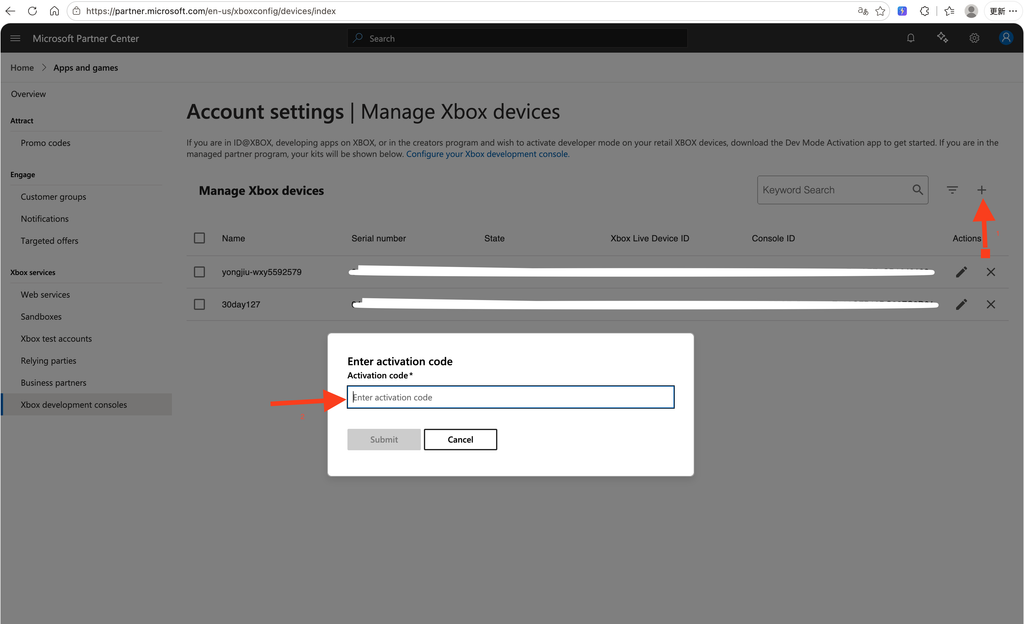
After unlocking, click the Switch and Restart button in the Xbox Dev Mode app and wait about 5 minutes for the console to boot into Developer Mode.
Notice:To ensure Developer Mode works smoothly, make sure the console has 30 GB of available space in Retail Mode, and update the console system software to the latest version before switching.