
KytyPS5 for Xbox: Exploring Running PS5 Games on Xbox Series X|S
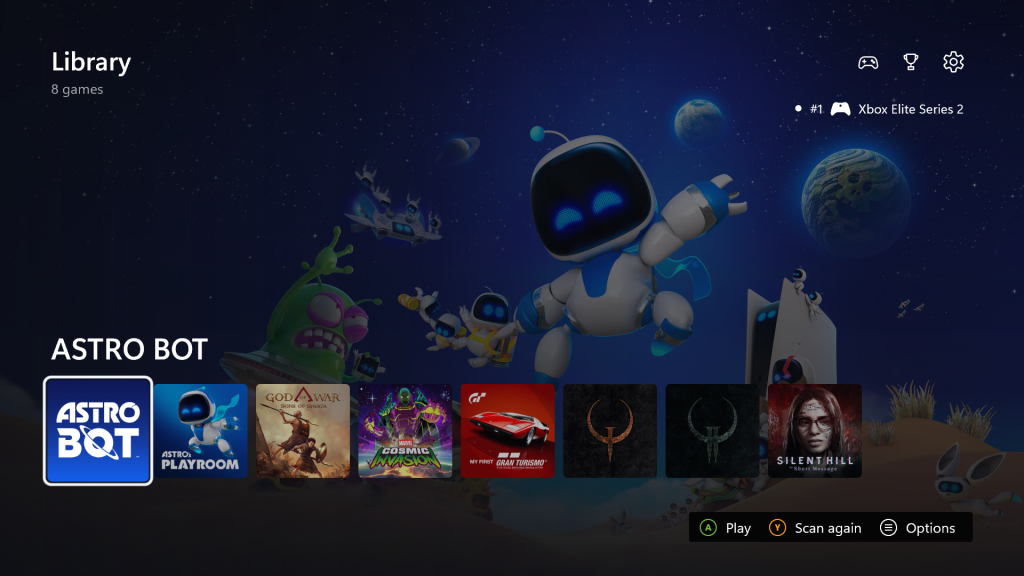
KytyPS5 for Xbox is an open-source experimental project of considerable exploratory significance. It attempts to port the PlayStation 5 compatibility layer KytyPS5, originally aimed at Windows, Linux, and macOS, to Xbox Series X|S, allowing Xbox users to run a UWP-based PS5 game compatibility environment through Developer Mode.
Unlike traditional Xbox emulators, this project is not simply porting a PC program; rather, it involves extensive low-level adaptation for the Xbox system environment, memory limitations, and graphics hardware, including a Direct3D 12 rendering backend, game memory management, controller input conversion, and USB storage device support.
It should be noted that KytyPS5 for Xbox is still an experimental project. It does not mean that Xbox is already fully compatible with PS5 games; whether a game can launch, its running speed, and its graphics performance all depend on the specific game and the current project version.
1. Project Overview
KytyPS5 was originally an open-source PlayStation 5 compatibility layer project, with the goal of researching and implementing a PS5 game runtime environment on other operating systems.
The Xbox branch maintained by Cosmo further ports it to the Developer Mode of Xbox Series X|S and packages the emulator as a UWP application.
This means users do not need to run a traditional desktop Windows emulator on Xbox; instead, they can install a specially built application through Xbox Developer Mode.
The project currently has the following features:
- Designed for Xbox Series X|S Developer Mode.
- Uses a UWP application as the launcher and runtime environment.
- Uses Direct3D 12 as the Xbox graphics rendering backend.
- Supports game library, game covers, and game settings.
- Supports mapping Xbox controller input to PS5 controller input.
- Supports trophies, game running status monitoring, and performance information display.
- Supports game files on USB storage devices.
The project's official documentation clearly states that the Xbox version is an experimental build and does not support Xbox One.
2. Main Features and Highlights
1. A game launcher designed specifically for Xbox
KytyPS5 for Xbox does not simply move the emulator window onto Xbox; instead, it designs a game management interface suitable for controller operation.
After launching the application, users can browse added games through the game library and view game covers, backgrounds, and related information.
The features currently provided by the launcher include:
- Game cover and background display.
- Game list scanning and refreshing.
- Game launching and closing.
- Per-game settings.
- Controller operation prompts.
- Game trophy information.
- Game running status monitoring.
The overall interface uses a layout similar to the Xbox system, minimizing reliance on keyboard and mouse.
2. Direct3D 12 graphics rendering backend
This is one of the most important parts of the entire Xbox porting effort.
The original KytyPS5 uses the Vulkan graphics interface, while the Xbox UWP environment requires adaptation to the graphics technologies it supports.
Therefore, the Xbox branch adds a Direct3D 12 rendering backend and uses Mesa's SPIR-V to DXIL conversion component to handle shaders.
Simply put, the project needs to convert the graphics commands and shaders of PS5 games into a form that Xbox can handle, and then complete graphics rendering through Direct3D 12.
Because the GPU capabilities of Xbox Series X|S are not exactly the same as those of PS5, some graphics features require additional adaptation, and some features that cannot yet be implemented are skipped.
This is also why it cannot currently be guaranteed that all games will display correctly.
3. Xbox controller mapping and multiplayer support
KytyPS5 for Xbox has made special adaptations for the Xbox controller.
The project converts Xbox controller input into the controller state required by PS5 games, including:
- Button input.
- Analog sticks and triggers.
- Touchpad-related input mapping.
- Motion sensor input.
- Vibration feedback.
- Mapping of adaptive triggers and haptic feedback.
In addition, the project supports up to four Xbox controllers participating in a game.
Note that the Xbox controller does not have all the hardware capabilities of the DualSense, so the features here are input and feedback mappings and do not mean that the experience of the original DualSense can be fully replicated.
4. Game trophy system
The project also implements game trophy-related features.
Users can view a game's trophy information in the launcher, including trophies of different tiers and the progress already achieved.
For some games, when a trophy is unlocked, a corresponding prompt can also be displayed through Xbox system notifications.
Trophy data is managed by the project itself and is not equivalent to the official PlayStation Network trophy synchronization service.
5. USB external storage support
Considering that game files may take up a large amount of storage space, the project supports reading game files from USB storage devices.
Games can be added to the game library in the form of folders or .zar archives.
In addition, save data, patches, and trophy data can also be stored in a user-specified storage directory.
This has practical significance for storage space management under Xbox Developer Mode.
6. Memory management and performance monitoring
The PS5 game runtime environment has high requirements for memory and graphics resources, while Xbox UWP applications also have their own memory limitations.
To solve this problem, the developer has implemented multiple Xbox-specific optimizations:
- Commit game memory on demand to reduce unnecessary memory usage.
- Use swap files to manage memory regions that are temporarily unused.
- Provide settings related to texture quality and memory usage.
- Support shader and graphics pipeline caching.
- Provide monitoring of CPU, GPU, RAM, and swap file status.
During game execution, users can also view frame rate, GPU time, shader compilation status, and memory usage through the performance overlay.
These features are not only used to improve the running experience but also help developers analyze issues such as games failing to launch, graphics anomalies, or insufficient memory.
3. How It Works
KytyPS5 for Xbox does not run PS5 games natively on Xbox; instead, it implements runtime environment adaptation between different platforms through a compatibility layer.
The entire execution process can be simply understood as:
- The user launches the KytyPS5 UWP application through Xbox Developer Mode.
- The application scans the specified directory and identifies game files that meet the requirements.
- KytyPS5 loads the game program and related runtime environment.
- The project converts the game's graphics commands and shaders into a form that Xbox can handle.
- Direct3D 12 handles graphics rendering, and XAudio2 handles audio output.
- Xbox controller input is mapped and then passed to the game.
It should be emphasized that the compatibility layer is not a complete PS5 hardware emulator. It needs to gradually implement and adapt the system functions that games depend on, so there may be large compatibility differences between different games.
4. How to Install on Xbox?
The project currently provides an experimental installation package for Xbox Series X|S Developer Mode.
The basic installation process is as follows:
Prerequisites
- Xbox Series X or Xbox Series S.
- Xbox Developer Mode enabled.
- Access to Xbox Device Portal.
- A computer for downloading and uploading the installation package.
- A USB storage device for storing game files.
Installation Steps
- Go to the project's GitHub Releases page to download the latest Xbox version.
- Extract the downloaded installation package on the computer.
- Open Xbox Device Portal.
- Go to the application installation page and select Add.
- Upload the .msix main installation package and the two dependency files in the Dependencies folder.
- After installation is complete, set the application type to Game in Xbox Dev Home.
- Configure the game file directory and USB storage access permissions according to the project documentation.
- Launch KytyPS5, scan the game directory, and try to run a game.
Note: Installation files may vary between versions; please refer to the files and instructions provided on the corresponding Release page.
5. Current Compatibility and Known Limitations
KytyPS5 for Xbox is still in the experimental stage and cannot be regarded as a mature PS5 game execution solution.
Main limitations include:
- Not all games that can run on the PC version can run on Xbox.
- Some GPU features not supported by the Xbox graphics driver cannot be properly implemented.
- Some graphics commands are skipped, which may cause visual anomalies.
- Games may encounter launch failures, slow shader compilation, or insufficient memory.
- Long-running sessions may still be limited by GPU memory and system resources.
- The actual performance of Xbox Series X and Series S needs to be verified separately.
The project developer is continuously improving graphics rendering, memory management, audio, and game compatibility.
If you plan to try it, it is recommended to start with the project's changelog and known limitations, and not to treat it directly as a stable game execution environment.
6. Project Address and Download
Project Name: KytyPS5 for Xbox
Developer: Cosmo
Project Type: PS5 compatibility layer / Xbox UWP port
Platforms: Xbox Series X|S Developer Mode, Windows Developer Mode
Graphics Interface: Direct3D 12
License: GPL-2.0-only
Official Resources:
- GitHub project homepage: https://github.com/Cosmo/KytyPS5
- Latest version download: https://github.com/Cosmo/KytyPS5/releases
- Xbox port changelog: https://github.com/Cosmo/KytyPS5/blob/master/XBOX_CHANGES.md
- Installation and usage instructions: https://github.com/Cosmo/KytyPS5/blob/master/src/uwp/README.md
- Original KytyPS5 project: https://github.com/KytyPS5/KytyPS5
It is recommended to obtain the installation package through the official GitHub Releases first, and not to use third-party modified versions of unknown origin.
7. Copyright and Disclaimer
KytyPS5 is an experimental software project developed by the open-source community. YOSOnia is not the developer of this project and is not affiliated with Sony Interactive Entertainment, PlayStation, or Microsoft.
This website only provides project introductions, technical information, and guides to official open-source resources. It does not provide PS5 game images, BIOS, firmware, or other copyrighted game files.
Users should comply with the laws and regulations of their location and use only legally obtained game files.
Project copyright, license terms, and rights related to third-party components belong to their respective rights holders. When using or redistributing the project, please refer to the license terms and copyright notices in the official repository.
Support this site
If these guides helped you, you can buy me a coffee and keep the project going.
You can also support us on these platforms (opens in a new tab)